
SQL Formatter
Pretty-print SQL queries with support for MySQL, PostgreSQL, and many other dialects.
About SQL Formatter
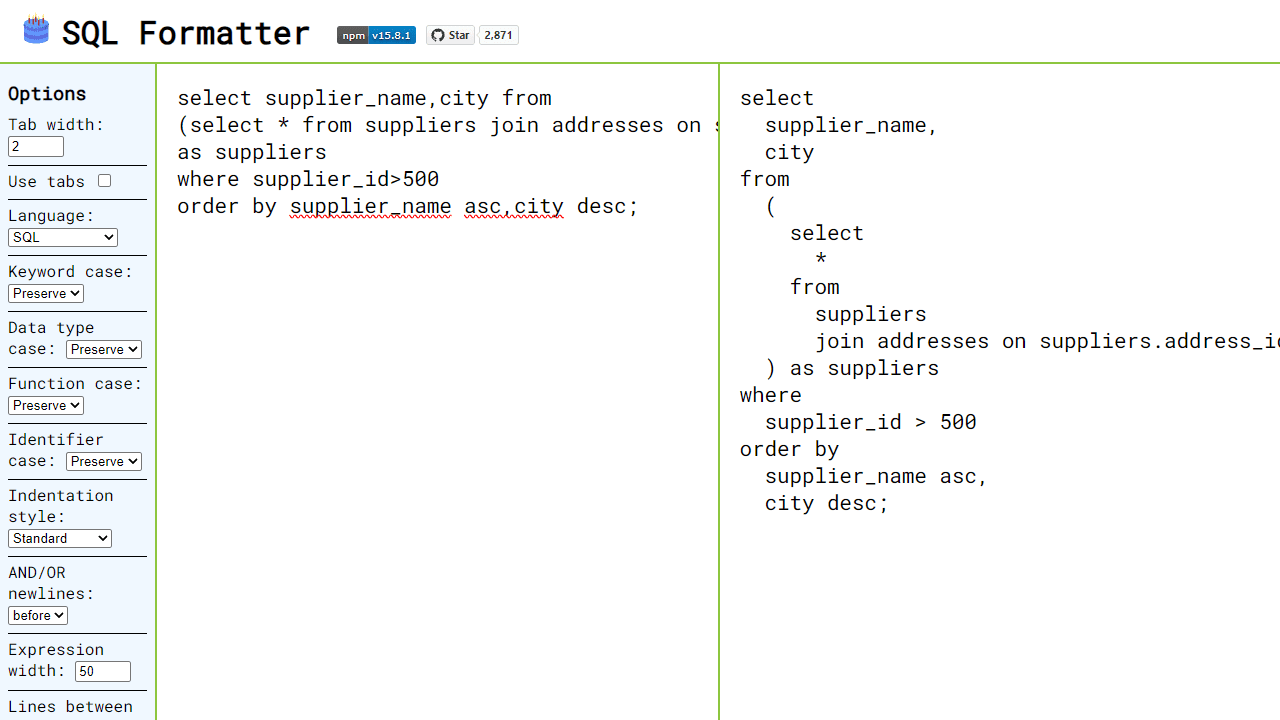
Paste a tangled wall of SQL and watch it snap into clean, readable structure. SQL Formatter handles the heavy lifting — indenting nested subqueries, aligning keywords, and breaking long clauses onto separate lines so logic that was buried becomes obvious at a glance. It supports a wide range of dialects, including MySQL, PostgreSQL, SQLite, BigQuery, and more, so it fits whatever stack you're already working with.
It's a natural fit alongside other developer tools when you're deep in a debugging session or reviewing queries pulled straight from a log file. If you find yourself also needing to spot exactly what changed between two query versions, Text Diff pairs well for that comparison step.
The formatter works entirely in the browser with no sign-in required — just paste, choose your dialect from the dropdown, and copy the result. Particularly handy on a wide monitor where the reformatted output and your editor can sit side by side.
Look inside
How to use
This tool formats and prettifies SQL queries to improve readability. Paste messy SQL code and get clean, properly indented output. 1. Type or paste your SQL query in the left text area 2. The formatted result appears automatically in the right text area 3. Use the options panel on the left to customize formatting: - Select your SQL dialect (MySQL, PostgreSQL, BigQuery, etc.) - Adjust indentation (tab width, use tabs vs spaces) - Change case for keywords, functions, and data types - Control line breaks and spacing Key controls: - Left textarea: Input your unformatted SQL - Right textarea: View the formatted output (read-only) - Options panel: Adjust formatting preferences - All changes apply instantly as you type or modify settings The tool supports many SQL dialects and handles complex queries with joins, subqueries, and multiple statements. If there's a syntax error, an error message will display instead of formatted output.
Reviews
No written reviews yet. Be the first!
More from Developer

Convert Scratch projects into standalone HTML files. Upload a Scratch project and download a self-contained web page you can share.
by SheepTester


