
Regex Tester
Test regular expressions with live highlighting. See matches, groups, and flags in real-time.
About Regex Tester
Paste a regular expression and some test text, and Regex Tester highlights every match instantly — no page reloads, no guessing. Groups are broken out separately so you can confirm each capture is grabbing exactly what you intended, and toggling flags like g, i, or m updates the results on the spot.
Writing a pattern from scratch is where this tool earns its keep. Instead of cycling between an editor and a browser console, you stay in one place and watch the highlighting shift as you refine the expression. It's the kind of tight feedback loop that catches a misplaced quantifier before it reaches production code.
Find it alongside other utilities in the developer tools collection. If you also need to spot differences between two strings or outputs, Text Diff covers similar ground for line-by-line comparison. Regex Tester works best on a wider screen, since the match and group panels sit side-by-side and a narrow viewport collapses them into a less readable stack.
Look inside
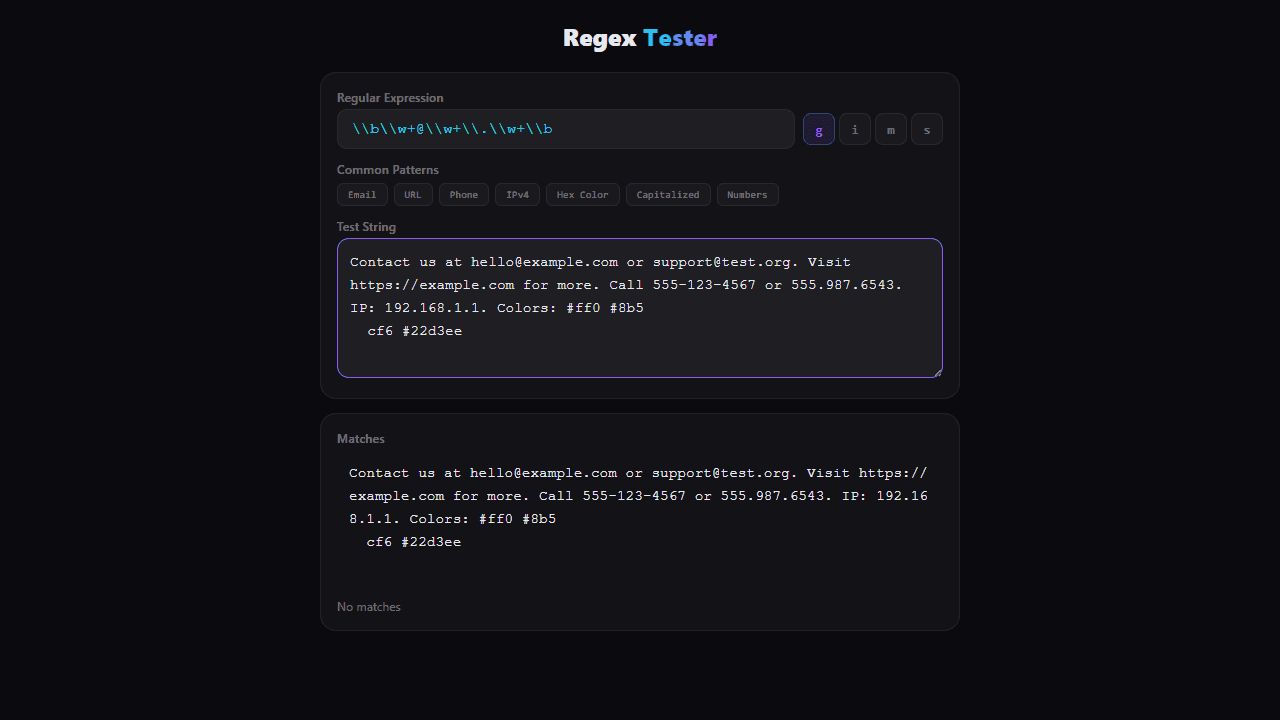
How to use
Test and debug regular expressions (regex patterns) against sample text. • Enter your regex pattern in the "Regular Expression" field • Type or paste test text in the "Test String" textarea • Click flag buttons (g, i, m, s) to toggle regex modifiers: - g: global (find all matches) - i: case insensitive - m: multiline mode - s: dot matches newlines • Click preset buttons for common patterns like Email, URL, Phone numbers • Matches are highlighted in the output with alternating colors • Match count and positions are shown below the output • Invalid regex patterns will show error messages in red • Use this tool to validate patterns before implementing them in code
Reviews
No written reviews yet. Be the first!
More from Developer

Convert Scratch projects into standalone HTML files. Upload a Scratch project and download a self-contained web page you can share.
by SheepTester


