
Text Diff
Compare two blocks of text side-by-side with highlighted differences. Your text never leaves the browser.
About Text Diff
Paste two blocks of text into the left and right panels, and Text Diff immediately highlights exactly what changed — additions, deletions, and modifications shown side-by-side in color-coded lines. No uploading, no accounts, no server round-trips. Everything runs locally in your browser, so sensitive code, config files, or draft copy stays on your machine.
It's a natural fit for developer tools workflows: spot what changed between two versions of a function, compare a raw API response against an expected output, or sanity-check a colleague's edits before merging. If you also work with patterns, Regex Tester pairs well for digging deeper into the text once you've isolated the differences.
The interface is minimal by design — just two text areas and a clear diff view below. It works best with plain text and code; very long documents with thousands of lines may slow the highlight rendering slightly, so trim to the relevant section when precision matters most.
Look inside
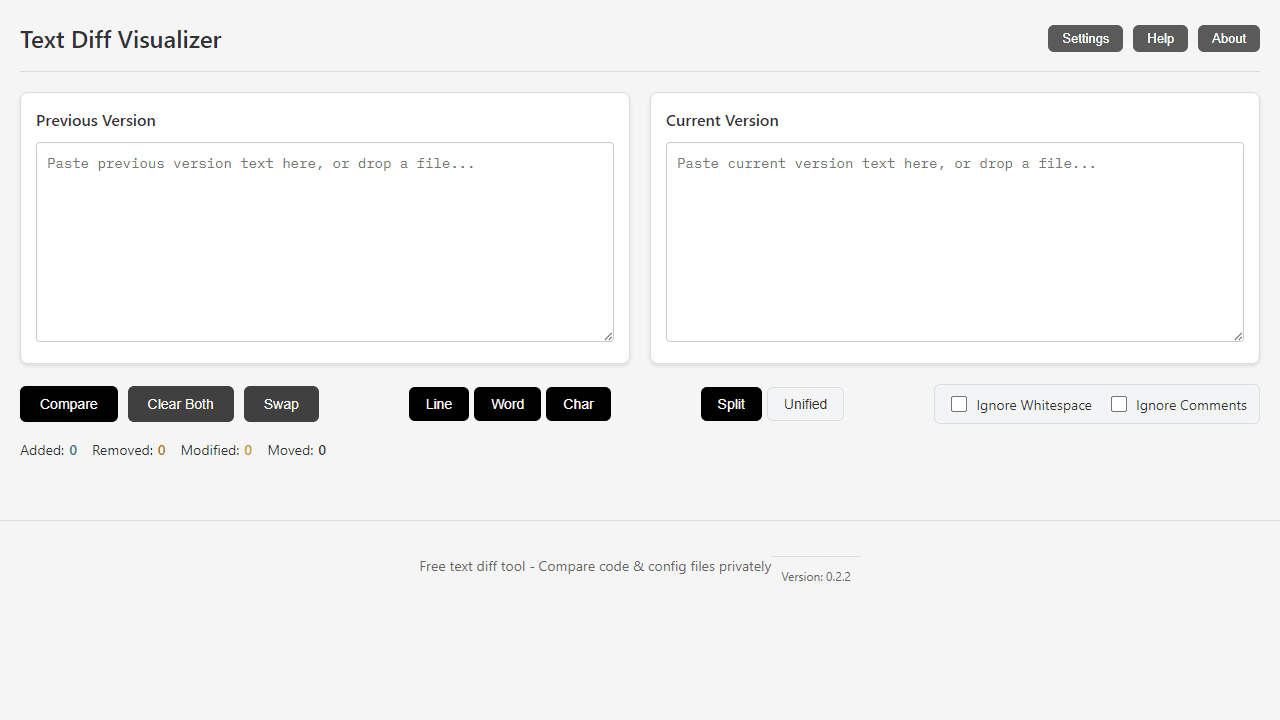
How to use
This tool compares two text files or code snippets and highlights the differences between them. • Paste your original text in the left panel and modified text in the right panel • Click "Compare Files" to generate the diff visualization • Use "Clear All" to reset both text areas View options: • Toggle between "Side by Side" and "Unified" view using the view buttons • Side by Side shows texts in parallel columns with changes highlighted • Unified view shows a single merged view with +/- indicators Change types are color-coded: • Green highlights show additions • Red highlights show deletions • Yellow/amber highlights show modifications • Blue highlights show moved text blocks Filter options: • Use filter controls to show/hide specific types of changes • Toggle visibility of additions, deletions, modifications, and moves Additional features: • Your text never leaves your browser - completely private • Supports large files up to 10,000+ lines • Use keyboard shortcuts: Ctrl+A to select all, Ctrl+C/V to copy/paste • Text areas auto-resize vertically as you type
Reviews
No written reviews yet. Be the first!
More from Developer

Convert Scratch projects into standalone HTML files. Upload a Scratch project and download a self-contained web page you can share.
by SheepTester


