
Ambient Sound Mixer
Mix nature sounds, white noise, and ambient audio to enhance focus or relaxation.
About Ambient Sound Mixer
Drag a handful of sliders — rain on a tin roof, a low-frequency hum, distant thunder, maybe some café chatter — and Ambient Sound Mixer builds a layered soundscape you can tune to exactly the right texture for reading, working, or winding down. Each source has its own volume control, so you're not stuck with a preset someone else decided sounds relaxing. That level of control is rarer than it should be.
It sits naturally in the creative apps catalog because the real product is something you've made yourself. Two people with the same sources will land in completely different places. If you'd rather express that sound-crafting instinct through something more rhythmic, Blip goes in a different direction — chiptune loops instead of ambient layers, but the same cell-by-cell tinkering approach.
Headphones make a noticeable difference here: stereo separation between channels is part of how the depth is built, and speakers flatten that out. No account needed, no install — just open it and start mixing.
Look inside
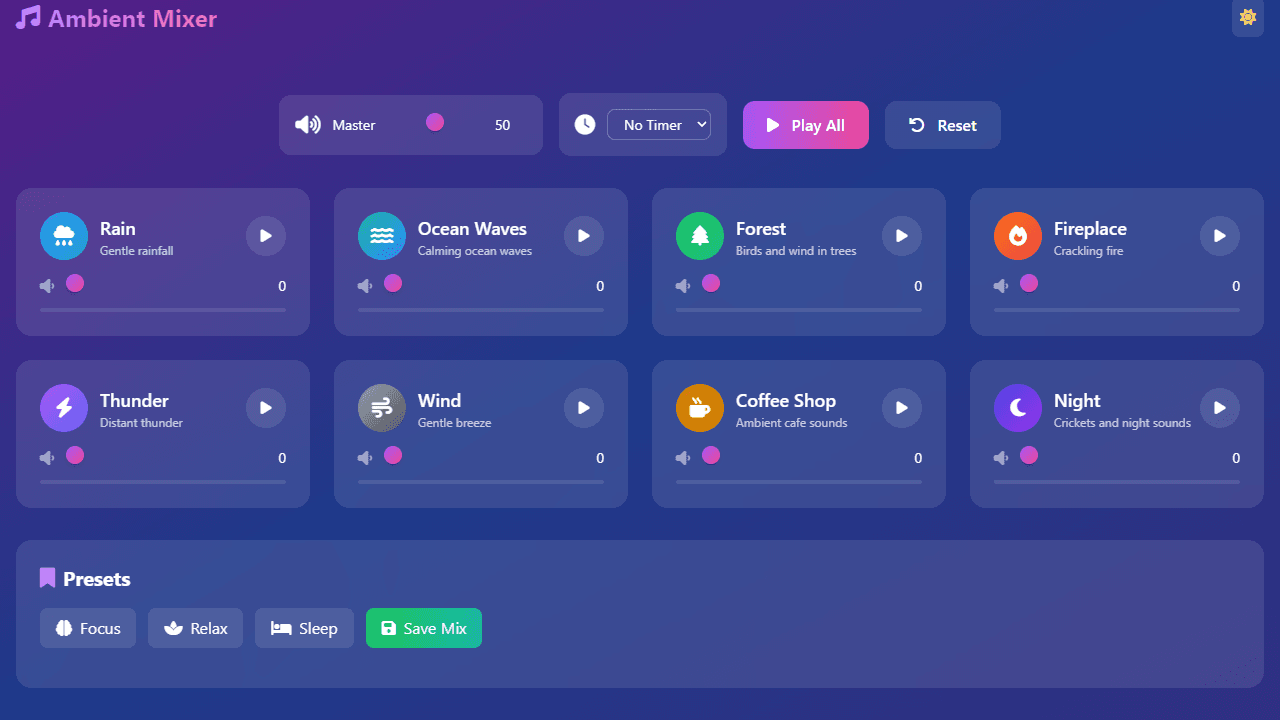
How to use
• Create custom ambient soundscapes by mixing different background sounds like rain, forest, cafe noise, and more • Click individual sound cards to toggle them on/off - each card shows a play/pause button and volume slider • Adjust the volume for each sound using its slider, or use the master volume control to adjust everything at once • Use "Play All" to start/stop all active sounds simultaneously, or "Reset" to stop everything and return volumes to default • Set a timer using the dropdown menu to automatically stop sounds after a set duration (5-60 minutes) • Try built-in presets like "Focus," "Relax," or "Sleep" for pre-configured sound combinations • Save your custom mixes by clicking "Save Mix," entering a name, then accessing them later from the custom presets section • Toggle between light and dark themes using the sun/moon button in the top-right corner • Layer multiple sounds at different volumes to create your ideal atmosphere for work, relaxation, or sleep
Reviews
No written reviews yet. Be the first!
More from Creative

A casual chiptune loop maker. Tap cells, pick a vibe, share remixable 16-step loops in under a minute.
by Launch Arcade


