
ChronoAlarm Clock
A comprehensive alarm clock and productivity app with timezone support, Pomodoro timer, customizable sounds, and smart scheduling features.
About ChronoAlarm Clock
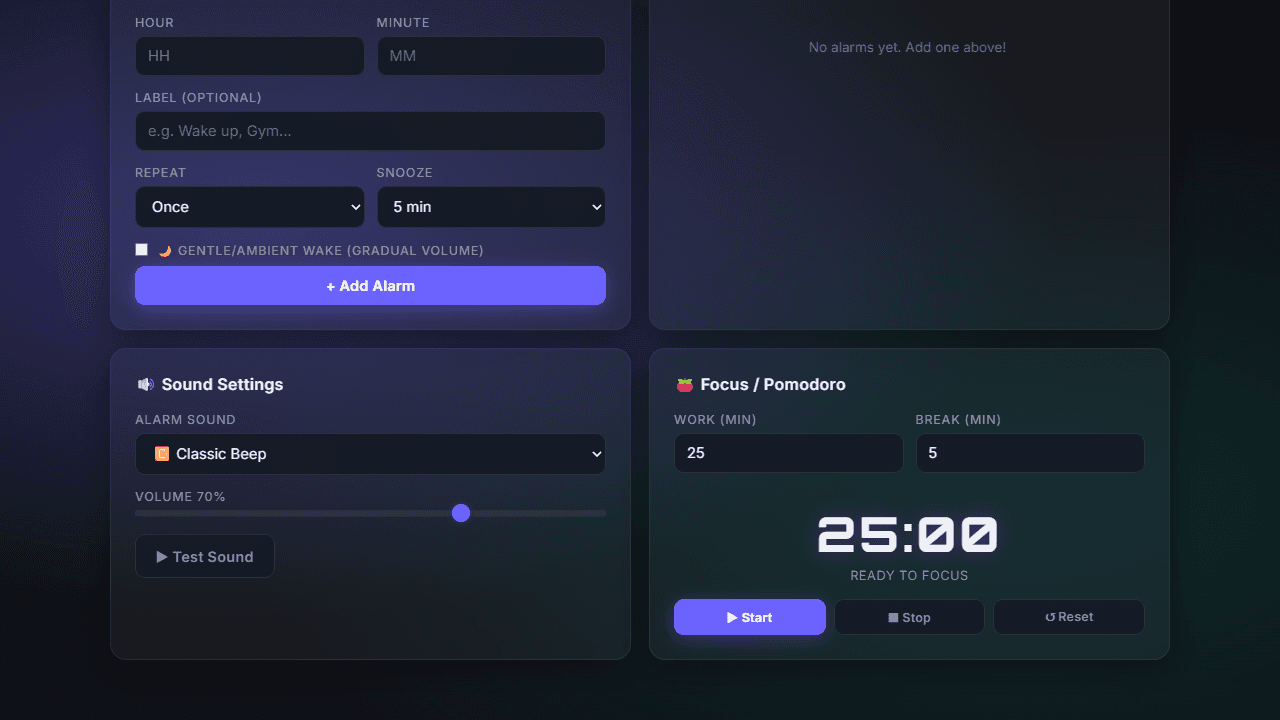
Set an alarm, run a focused work sprint, and manage meetings across time zones — all from one place. ChronoAlarm Clock handles the basics well, but the Pomodoro timer is where it earns its place in a daily routine: pick your work and break lengths, start the cycle, and let the app keep you honest. Custom alarm sounds mean you're not stuck with a single jarring beep, and smart scheduling lets you set alarms that only fire on the days that actually matter.
The timezone support is genuinely useful for anyone juggling remote teams or international calls. You can see multiple clocks at once and schedule alarms in a foreign timezone without doing the mental math yourself. It's a practical tool that covers a lot of ground without demanding much setup time.
If a full-featured task list alongside your timer sounds useful, Task Manager is worth a look. ChronoAlarm lives in the broader productivity category alongside planners and note-takers. It works best on a desktop browser, where keyboard shortcuts make navigating between the clock, timer, and scheduler noticeably faster.
Look inside
How to use
This productivity app combines a smart alarm clock with focus tools to help manage your daily schedule and improve productivity. **Setting Alarms:** • Enter hour and minute using number inputs • Add optional label for alarm description • Choose repeat mode: once, daily, or weekdays only • Select snooze duration (5 or 10 minutes) • Check "Gentle/Ambient Wake" for gradual volume increase • Click "Add Alarm" to save **Managing Alarms:** • Toggle alarms on/off using switches in alarm list • Delete alarms with trash icon • View countdown to next active alarm at top • Accept smart suggestions when they appear **Sound Settings:** • Select alarm sound from dropdown menu • Adjust volume with slider • Click "Test Sound" to preview **Pomodoro Timer:** • Set work and break durations in minutes • Click "Start" to begin focus session • Timer automatically switches between work and break periods • Use "Stop" to pause or "Reset" to restart **Additional Features:** • Change timezone from dropdown menu • Toggle between 12-hour and 24-hour formats • Receive browser notifications when alarms trigger • Interface automatically adjusts for day/night themes
Reviews
No written reviews yet. Be the first!
More from Productivity

A minimal, single-page Markdown editor with instant live preview. Toggle between editor and preview on mobile, or use the side-by-side layout on desktop.


