
Invoice Generator
Create professional invoices with line items, tax calculation, and notes. Print or save as PDF directly from the browser.
About Invoice Generator
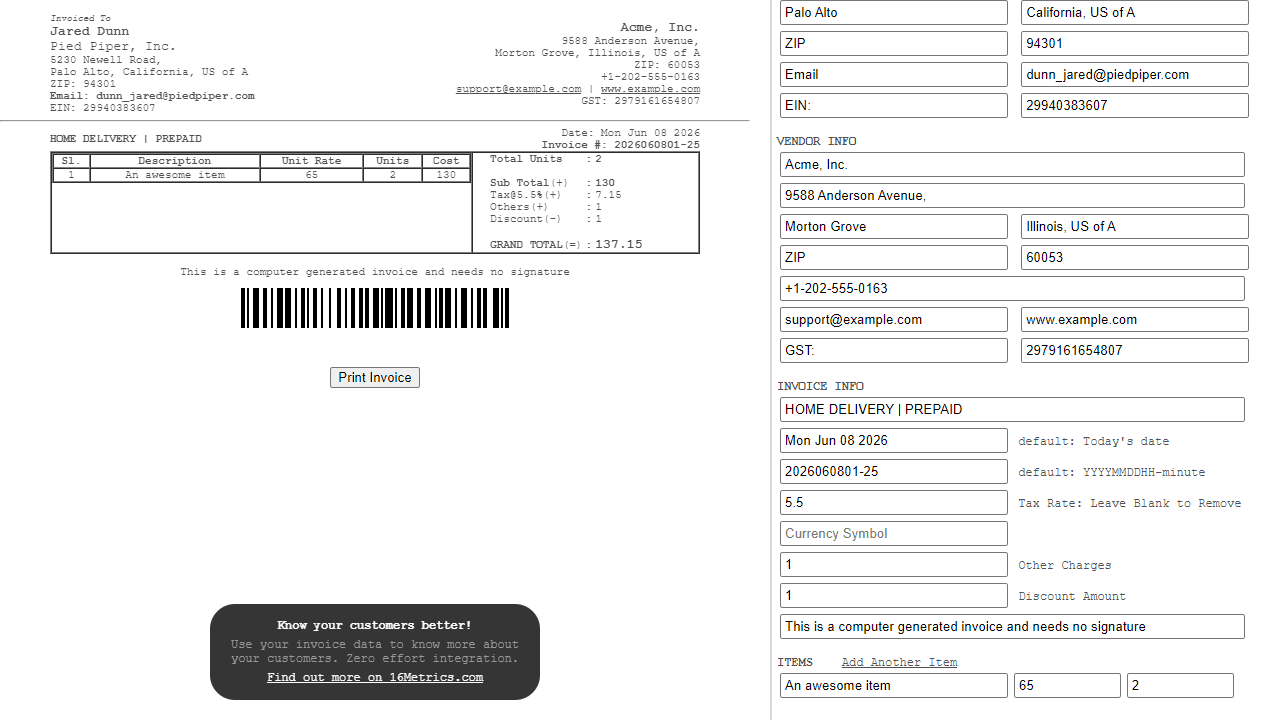
Fill in your business details, add line items with quantities and rates, and Invoice Generator handles the tax calculation and running totals automatically. When you're done, print the invoice or save it straight to PDF without leaving the browser — no account, no subscription, no waiting.
It's a clean, no-friction tool built for freelancers and small business owners who need a professional-looking invoice quickly. The layout is straightforward: client info at the top, itemized table in the middle, totals and notes at the bottom. If you want a permanent record of where the money is going once the invoice is paid, Kharcha covers similar ground on the income and expense side. For more tools like this, the finance category has several worth browsing.
Works entirely in the browser, so a desktop or laptop is the practical choice — the full invoice table and PDF output behave best on a larger screen with access to a real print dialog.
Look inside
How to use
This is a web-based tool for creating professional invoices that works entirely in your browser. • **Left panel** displays your invoice preview • **Right panel** contains input fields for customization • **Mouse controls**: Click in text fields to edit information **Basic Setup:** 1. Fill in customer details (name, address, contact info) 2. Enter your business information in vendor fields 3. Set invoice date and number (auto-generates if left blank) **Adding Items:** 1. Click "Add Another Item" to create new invoice lines 2. Enter description, unit rate, and quantity for each item 3. Serial numbers generate automatically 4. Totals calculate automatically - cannot be edited manually **Calculations:** • Set tax rate percentage (leave blank to remove tax) • Add other charges and discounts as needed • Grand total updates automatically as you type **Finishing:** • Add final notes or payment terms • Click "Print Invoice" to print or save as PDF • All data stays in your browser - nothing is sent online **Note:** Items can be modified after adding but cannot be deleted. The layout is optimized for printing on standard paper.
Reviews
No written reviews yet. Be the first!


