
STL to ASCII
Load a 3D STL model and render it as ASCII art characters. Includes sample models to try instantly.
About STL to ASCII
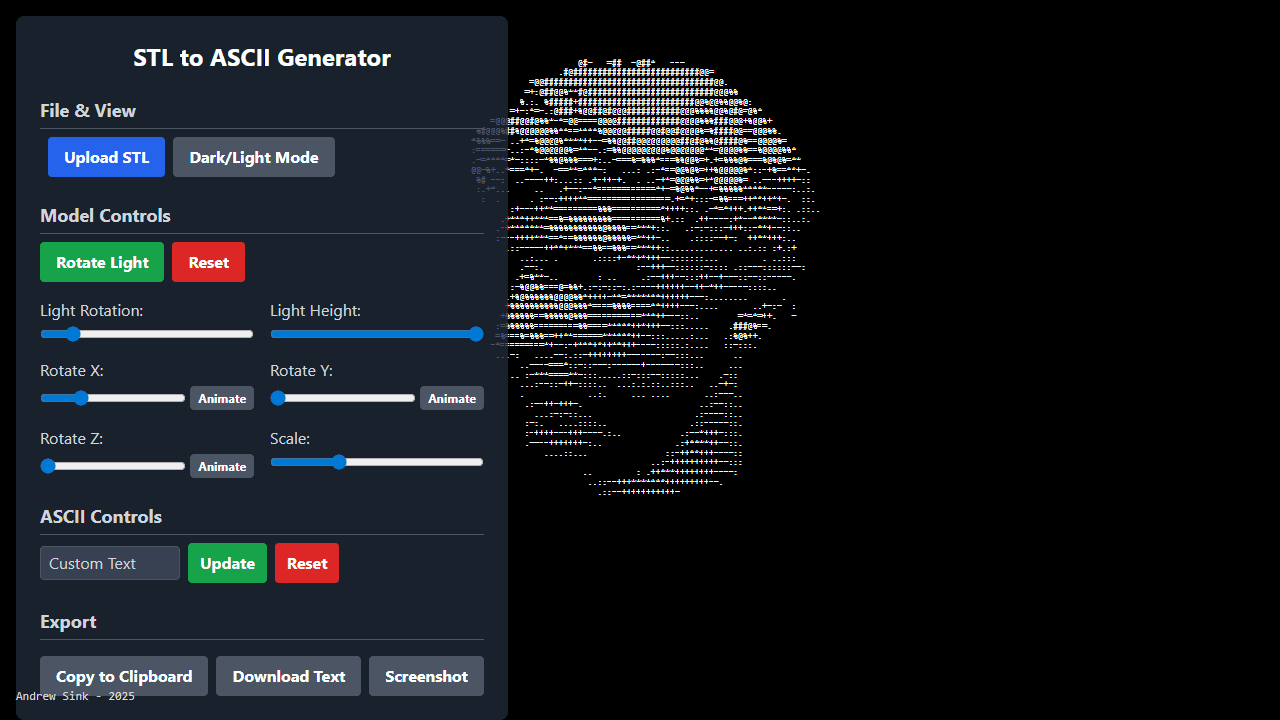
Drop any STL file onto the converter and watch your 3D model collapse into a grid of ASCII characters — letters, symbols, and punctuation standing in for geometry and shadow. It's a surprisingly faithful translation: curved surfaces become rippling text, hard edges snap into clean lines of punctuation. A handful of sample models are bundled in, so you can see results immediately without hunting for your own files.
It's a practical pick for developers documenting terminal tools, makers who want a retro preview of a print, or anyone curious how a mesh looks stripped down to plain text. The output works well pasted into READMEs, code comments, or anywhere a proper 3D viewer isn't an option. Browse more utilities like this in Tools.
The app runs entirely in the browser — no install, no account. For best results, use a model with clear silhouette geometry; highly detailed or thin-walled STLs tend to produce dense, harder-to-read output at default character density.
Look inside
How to use
This tool converts 3D STL files into ASCII art images that you can view, customize, and export. • Click "Upload STL" to load your 3D model file • Use sliders to rotate the model on X, Y, and Z axes for the best viewing angle • Click "Animate" buttons next to rotation sliders to auto-rotate the model • Adjust "Light Rotation" and "Light Height" sliders to change how shadows appear • Use "Scale" slider to resize the model • Change "Dark/Light Mode" to switch background colors Customize ASCII characters: • Type custom text in the input field and click "Update" to use those characters • Click "Reset" to return to default character set Export your creation: • "Copy to Clipboard" - copies ASCII text for pasting elsewhere • "Download Text" - saves ASCII as a text file • "Screenshot" - captures the current view as an image • Click "Reset" to return all settings to defaults • On mobile, use the menu button to access controls
Reviews
No written reviews yet. Be the first!
More from Tools

A witchy weather app where Morgana the Witch peers into the meteorological beyond. Get current conditions, hourly forecasts, and a 7-day outlook for any city in the world — then check back tomorrow to see if the Witch's prophecy held, or if she "cast a spell" to change the weather.
by mercury


