
Duration Picker
An interactive duration picker for hours, minutes, and seconds. Scroll or type to set precise time durations — clean, lightweight, no dependencies.
About Duration Picker
Spin the scroll wheel or type directly to set a duration down to the exact second. Duration Picker gives you three clean columns — hours, minutes, seconds — and lets you combine both input methods however feels natural. Need 1 hour 23 minutes 45 seconds? Two quick scrolls and a typed value and you're done.
It's a focused tools utility: no dependencies, no setup, nothing extraneous. That makes it handy for developers who want to embed a reliable duration input into a project, or for anyone who just needs to nail down a precise time span without wrestling with a full-blown date-time library.
Works cleanly on both desktop and mobile — the scroll gesture translates well to touch swipe, so it holds up on a phone screen just as well as a trackpad.
Look inside
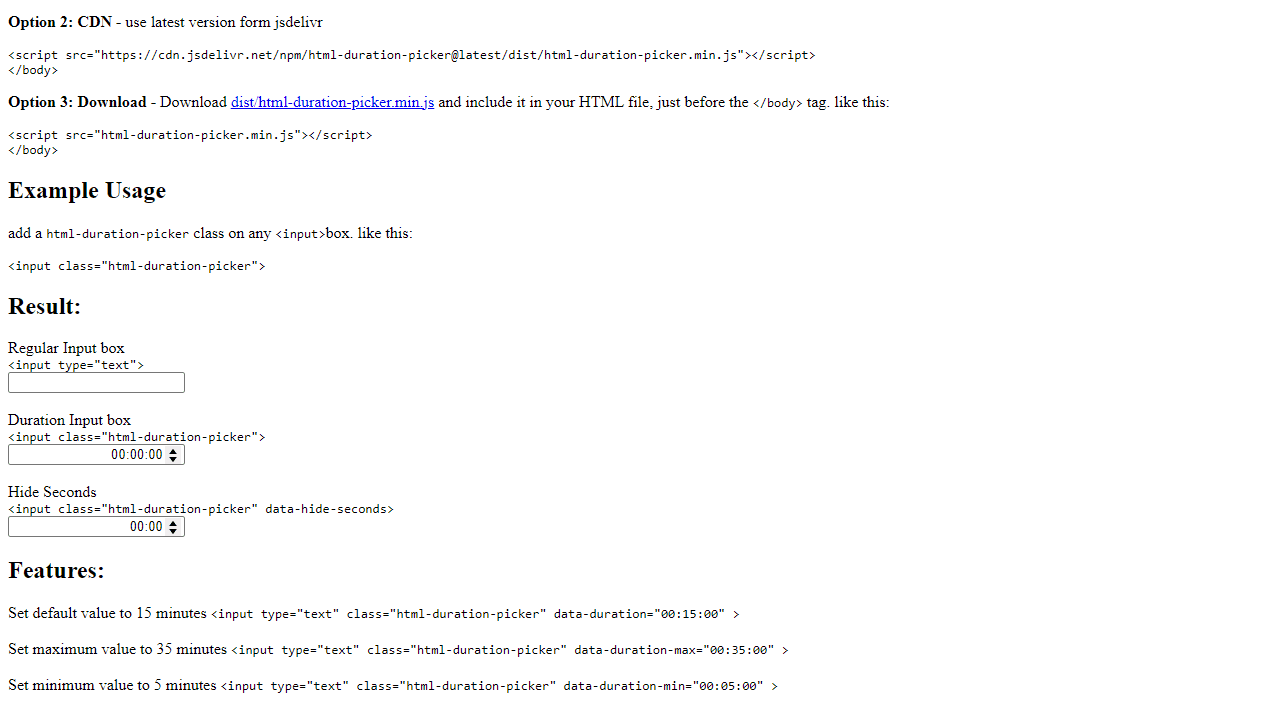
How to use
This tool converts regular text input fields into specialized duration pickers for selecting time periods in hours, minutes, and seconds format. **Purpose:** Select and input time durations in HH:MM:SS format using an enhanced interface with up/down controls for each time unit. **How to use:** 1. Click on any duration input field to activate it 2. Use mouse clicks on the up/down arrow buttons next to each time segment (hours, minutes, seconds) to adjust values 3. Alternatively, click directly in a time segment and type numbers to set specific values 4. Use Tab key to move between hours, minutes, and seconds fields 5. Use keyboard arrow keys (up/down) to increment/decrement the currently selected time segment **Controls:** - Mouse: Click arrows to adjust time or click segments to type values - Keyboard: Arrow keys to change values, Tab to switch between segments - The picker enforces valid time formats automatically **Features:** - Some pickers may hide seconds display - Default, minimum, and maximum duration limits may be preset - Values are displayed in standard HH:MM:SS format
Reviews
No written reviews yet. Be the first!
More from Tools

A witchy weather app where Morgana the Witch peers into the meteorological beyond. Get current conditions, hourly forecasts, and a 7-day outlook for any city in the world — then check back tomorrow to see if the Witch's prophecy held, or if she "cast a spell" to change the weather.
by mercury


